Catalina - Capri - 25s International Assocaition Logo(2006)  
Assn Members Area · Join
Association Forum
Association Forum
Home | Profile | Register | Active Topics | Forum Users | Search | FAQ
Username:
Password:
Save Password
Forgot your Password?

 All Forums
 Catalina/Capri 25/250 Sailor's Forums
 Swap Meet
 1985 Catalina 25 For Sale
 New Topic  Topic Locked
 Printer Friendly
Author Previous Topic Topic Next Topic  

Firewoood
Deckhand

Member Avatar

USA
4 Posts

Initially Posted - 05/03/2010 :  02:31:30  Show Profile
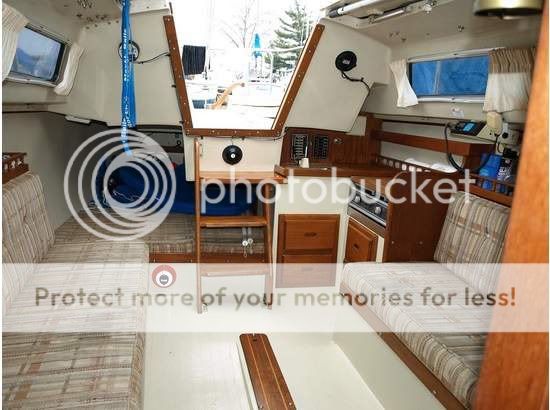
1985 Catalina-25 Great Condition Ready to Sail. Pop Top, Fixed Keel, Evinrude 9.9 Longshaft Electric Start. Autohelm 1000, Cockpit Cushions, Two Burner Alcohol Stove, Stainless Standing Rigging, New Running Rigging. Two New Fuel Tanks, Two New 12V Marine Batteries. All New Required Coast Guard Equipment. (3) Sails, Main, Jib, 150 Genoa in Very Good Condition. Sail-Away $7,000.00 (301) 866-5771 Casualobservertwo@msn.com
Solomons Island, MD Harbor Island Marina.

http://s935.photobucket.com/albums/ad196/NavyDavy/

Edited by - Firewoood on 05/10/2010 13:26:31

pwhallon
Admiral

Members Avatar

USA
694 Posts

Response Posted - 05/06/2010 :  10:34:49  Show Profile
<font size="5">Post Pics Please.</font id="size5">

Edited by - on
Go to Top of Page

Firewoood
Deckhand

Members Avatar

USA
4 Posts

Response Posted - 05/06/2010 :  11:00:38  Show Profile
<blockquote id="quote"><font size="1" face="Verdana, Arial, Helvetica" id="quote">quote:<hr height="1" noshade id="quote"><i>Originally posted by pwhallon</i>
<br /><font size="5">Post Pics Please.</font id="size5">
<hr height="1" noshade id="quote"></font id="quote"></blockquote id="quote">

Edited by - on
Go to Top of Page

Firewoood
Deckhand

Members Avatar

USA
4 Posts

Response Posted - 05/06/2010 :  11:01:22  Show Profile
HOW DO I POST PICTURES, sorry :-(

David

Edited by - on
Go to Top of Page

JudOWNED
1st Mate

Members Avatar

USA
98 Posts

Response Posted - 05/06/2010 :  11:36:57  Show Profile  Visit JudOWNED's Homepage
Upload them to an image hosting site like photobucket (free) and then post the link here with image tags.

Edited by - on
Go to Top of Page

jerlim
Master Marine Consultant

Members Avatar

USA
1484 Posts

Response Posted - 05/09/2010 :  18:53:42  Show Profile
How to Post Photos to the Forum

Posting photos to the forum from your computer is a two part process. The first part is to get the photos uploaded from your computer to a web host somewhere on the internet. The second part is copying the address of the uploaded photos into your forum message.

Part 1: Uploading Your Photos to the Internet

Your pictures need to reside on the internet in order for the forum program to display them for people to see. What you need to do is find a web host on the internet to store your photos. There are free web hosts that you can use. Most Internet Service Provider's (ISP's)will give space to you as part of your subscription to their service or you can go to places like Shutterfly at http://www.shutterfly.com/index.jsp or Yahoo Photos at http://photos.yahoo.com/ (I use Shutterfly because I had some linking problems with Yahoo ) and set up a free account in which to upload your pictures to. After you have an account, you will upload your photos from your computer to your photo account. This is a rather easy process, in which you will sign in to your photo account, select "add pictures", and then browse to the photos on your computer that you want to upload. Once the photos are selected and uploaded, they are now on the internet and are able to be referenced for inclusion into your messages.

Part 2: Posting Pictures in your Forum Messages

Inserting Image Code into your Forum Message
In order to post a picture in your forum message, it must first reside somewhere on the internet(See Part 1). If the picture is already on the internet, then you just need to click on the "Insert Image" icon when you compose your forum message. Clicking on the "Insert Image" icon will place the image code into your forum message. The image code looks like this, (img][/img). NOTE: The actual code contains brackets "[]" and not parentheses "()". "()" are used here so that the code can be seen.

(NOTE: If you are adding a picture to your profile signature you will need to manually type the image code(img][/img) since the Insert Image icon only appears when posting a message in the Sailor's Forum.)

Finding the Picture's Address (URL)
Now all you need to do is copy the address of the photo and paste it between the brackets of the image code. In a separate browser window, go to your photo account(or any site on the web with a picture) and bring up a photo you want to include in your forum message. Once your photo is fully up on the screen(For practice right now, let's pretend the photo below is the one from your account that you will be posting), put your mouse pointer over the picture, and click the right mouse button to bring up a menu. At the bottom of this menu select "Properties"with the left mouse button. When the properties box comes up, you will see the Address (URL) of the photo, which in the case of this photo is,

http://im1.shutterfly.com/procserv/47b3df32b3127cce93e75e65db4b0000001410

Copying the Picture's Address
The entire address(URL) is copied then pasted between the image code brackets ][ in your forum message. To copy this address, first highlight it by putting your mouse over the address in the properties box, then press the right mouse button, which brings up a menu, and choose "Select All" with the left button. After the address is selected, copy it by again putting your pointer over the highlighted area and click the right mouse button, then choose "Copy" with the left.

Inserting the Copied Picture Address into your Forum Message
Now, go back to your browser window that has your forum message, and place your cursor between the inner brackets ][ of the image code. Once it is in position, click the right mouse button to bring up a menu, then select "Paste" with the left mouse button.

If everything went according to plan, then the photo address should be copied between the brackets and the photo should be ready to view. If the photo did not work, go back and check that the ENTIRE address was copied or simply copy and paste it again. Additionally, if you are at a website, say SailNet, you can reference their pictures in your forum messages by simply copying the picture's address and pasting it in your message.

Good Luck and Have Fun!

Edited by - jerlim on 05/09/2010 18:55:42
Go to Top of Page

NautiC25
Admiral

Members Avatar

USA
957 Posts

Response Posted - 05/11/2010 :  05:40:46  Show Profile
Looks very clean. Good luck with the sale.


Here's the pics:


Edited by - on
Go to Top of Page
  Previous Topic Topic Next Topic  
 New Topic  Topic Locked
 Printer Friendly
Jump To:
Association Forum © since 1999 Catalina Capri 25s International Association Go To Top Of Page
Powered By: Snitz Forums 2000 Version 3.4.06
Notice: The advice given on this site is based upon individual or quoted experience, yours may differ.
The Officers, Staff and members of this site only provide information based upon the concept that anyone utilizing this information does so at their own risk and holds harmless all contributors to this site.